
How to Change the Batteries in Your Gas Fire Remote Control – A Simple Step-by-Step Guide
Is your gas fire remote control not working? Is your gas fire refusing to switch on, or is the remote becoming unresponsive?
Before worrying that something is wrong with your gas fire, it may simply be time to change the batteries!
Many modern gas fires use a remote control to turn the fire on and off, adjust the flame height and control other settings. Like any battery-operated device, the remote control and sometimes the fire’s receiver unit need fresh batteries from time to time.
In this guide, we’ll explain how to change the batteries in your gas fire remote control and what to check if your fire still isn’t responding.
1. Why does my gas fire remote control stop working?
There are several reasons why your gas fire remote may stop working, but flat or weak batteries are one of the most common.
You might notice:
- The remote display has become faint or disappeared.
- You need to press the buttons several times before anything happens.
- The gas fire doesn’t respond to the remote.
- The remote works intermittently.
- The fire switches off or fails to ignite when requested.
If you experience any of these problems, checking the batteries is a sensible first step.
2. What batteries do I need for my gas fire remote?
The type and number of batteries required will depend on the make and model of your gas fire and remote control.
Some remotes use AA or AAA batteries, while others use smaller specialist batteries.
Before buying replacements:
- Check the battery compartment for the required battery type.
- Look in your gas fire instruction manual.
- Check the manufacturer’s recommendations.
- Always use the correct battery type and voltage.
Never assume every gas fire remote uses the same batteries.
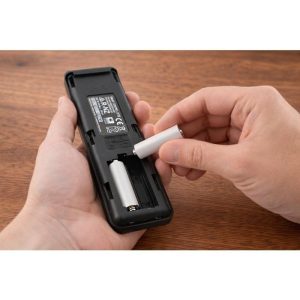
3. How to change the batteries in your gas fire remote control
Changing the batteries is usually straightforward.
Step 1 – Locate the battery compartment
Turn your remote control over and look for the battery cover. Depending on the design, it may slide off or have a small screw holding it in place.
Step 2 – Remove the old batteries
Carefully remove the existing batteries. Take note of which way they are fitted, paying attention to the positive (+) and negative (-) markings.
Step 3 – Insert the new batteries
Fit the new batteries, making sure they are the correct type and that the polarity matches the markings inside the compartment.
Step 4 – Replace the battery cover
Secure the battery cover and check that it is fitted correctly.
Step 5 – Test your remote control
Point the remote towards the gas fire and try the appropriate operating button, following the manufacturer’s instructions.
If everything is working correctly, your fire should respond as normal.

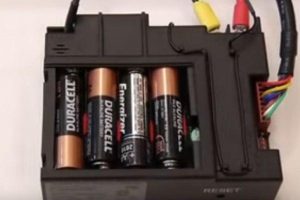
4. Don’t forget the batteries in your gas fire receiver!
Here’s something many gas fire owners don’t realise.
Some remote-controlled gas fires have a separate battery compartment inside the fire itself. This is often referred to as the receiver, control module or battery holder.
Even if you have changed the batteries in your handheld remote, your fire may still not work if the receiver batteries are flat.
The location of the receiver varies depending on the appliance. It may be behind an accessible control panel or in another designated compartment.
Important: Only access battery compartments identified as user-accessible in your manufacturer’s instructions. Always follow the manufacturer’s shutdown and isolation procedure before changing receiver batteries. Never remove sealed glass, dismantle the fire or interfere with gas connections or internal components.
If you cannot safely locate the receiver battery compartment, contact a suitably qualified gas fire engineer.
5. My gas fire still won’t work after changing the batteries – what should I do?
If you’ve fitted fresh batteries but your gas fire still won’t respond, there could be another issue.
Possible causes include:
- Incorrect battery polarity.
- Batteries that are the wrong type or voltage.
- Flat batteries in the receiver unit.
- A remote control that needs resetting or pairing.
- A fault with the receiver or ignition system.
Check your manufacturer’s instructions for any reset or synchronisation procedure specific to your model.
If your gas fire still doesn’t operate, don’t attempt to repair the ignition system or gas controls yourself. Contact a qualified gas fire engineer.
If you smell gas, do not attempt to operate the fire or electrical switches. Follow the emergency gas safety instructions for your area and contact the appropriate gas emergency service.
6. How often should I change my gas fire remote batteries?
There isn’t a set replacement interval because battery life depends on how frequently you use your fire and the type of batteries fitted.
A good idea is to:
- Keep a spare set of the correct batteries at home.
- Replace batteries when the remote starts becoming unreliable.
- Check the manufacturer’s recommended battery replacement intervals.
- Avoid leaving exhausted batteries in the remote for long periods.

Final thoughts
Changing the batteries in your gas fire remote control is often a quick and simple job, and it could save you an unnecessary call-out.
Remember to check both the handheld remote and any user-accessible receiver battery compartment, where applicable.
If you’ve changed the batteries and your gas fire still isn’t working, it’s always best to have it checked by a qualified professional.
A little maintenance can help keep your gas fire ready to provide warmth and comfort when you need it!